
A quick video on how to vignette the LOMO LCA and LCA+ using the mechanics of the camera to produce repeatable results!
indian hill imageworks
How to Focus Your LOMO LCA
This short informational video provides useful information on how to get “in focus” images, or at least more of them with the LOMO LCA. Focus is over rated in my opinion but it is nice to know how to just in case!
Link to the DOF Chart referenced in the video:
http://www.dofmaster.com/dofjs.html
UPDATE:
| “who the hell needs a video explaining zone focus? can it get any easier than this?”
Quote from a Flickr user who found this video (not sure if he watched it) and apparently found it revolting! I disagree completely that Zone Focus is easy, especially at first… fact is that most Zone focus camera users rely on many many rolls of experience or depth of field to get “sharp images”… this video points out a quick method to learn how to “focus” these systems (LCA) through visual memory and pace count. |
|
Part 2 – Is Cross Processing or XPRO Dead?

This is Part 2 to the post I made yesterday…more thoughts. A good sub-title for this would be: Process Does Matter!
Viva la Revolution- Stephen
Is Cross Processing or XPRO Dead?
I’ve just started a film test in preparation for my trip to Italy next month– the two films in consideration are Kodak Ektar 100 and Agfa Precia CT cross processed. Thus far, most of the artworks from my current series A New Eden are either XPRO (cross processed- E6 film in C41 chem) or expired film. However- after much testing here on FR I have recently fallen in love with the new Kodak Ektar …SO I decided to do a quick comparison test and find out: does the XPRO effect really have to be actual cross-processed film?
So what do YOU think? Look at the snapshots below and see if you can pick out the one that is the Agfa Precia CT XPRO…only one is true XPRO…the others are all Kodak Ektar in Photoshop using Alien Skin Exposure 2!
Think you have the right answer? Then give a listen to the Audio portion of this post for additional thoughts on cross processing / Xpro… as well as the answer!



Please click on the logo to listen to the audio.
When you finish with part one, click here to listen to part 2!
New Kodak Ektar 100 vs Kodak 100 Ultra Color
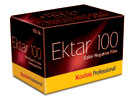
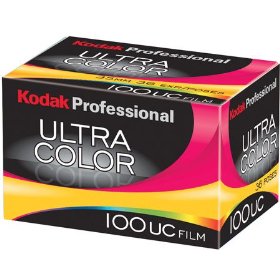
This is part 2 of my review of the new Kodak Ektar 100 film- click HERE to read part one. In this test I decided to compare the same scene photographed side by side, one shot with the new Kodak Ektar 100 and one with Kodak 100UC.
Test Specifications:
Camera: 2 Olympus XA cameras both just calibrated and shot at F8, focused at infinity.
Film: Kodak Ektar 100 rated at box speed (100) and Kodak 100UC also rated at box speed (100).
 Scanned on an Imacon scanner (dry) at 3000 PPI so around a 68MB 16 Bit RGB file.
Color Space: sRGB
No sharpening applied in the scan or in Photoshop. All scanner settings were set for Standard RGB Negative with full auto applied.
In Photoshop only AUTO settings were used (levels, contrast and color)- no additional image manipulation was applied. Test files were then down sampled to 8 Bit and reduced to 10″ x 6.5″ for faster download- saved as a JPEG, Level 10.
Please only download the sample files if you have a high speed internet connection as they are around 3MB each compressed.

 My Thoughts:
The Kodak 100 UC has a better exposure latitude, especially at box speed than Ektar 100 does but the grain is a bit more pronounced and the color is somewhat muted whereas the new Kodak Ektar 100 at box speed is a bit thin but has nice saturated colors and somewhat finer grain. Exposing the new Kodak Ektar at an EI of 50/ 64 will make this film very hard to beat.
Overall both films are quite nice but I tend to like the look of the Ektar best, especially when exposed at an EI of 50/ 64. I find scanning the new Kodak Ektar film quite easy and possible enlargements from a good sharp capture lens and a good quality scanner with a bit of work in Photoshop can produce some amazing quality prints even at sizes up to say 20″ x 30″… remember this is 35mm!

Note: If you want to try this film be sure to rate it at an EI of 50/ 64 otherwise your shadows will be thin and you will not be seeing all that is possible from this new offering. Yes, I like this film!
Please note that the sample files are for personal use only and are Copyright Stephen Schaub, 2009.
Olympus XA vs LOMO LCA and LCA Plus
Please watch this video first for a discussion on the pros and cons of the Olympus XA vs the LOMO LCA and LCA+. Please note that the video is of high quality and may take a few seconds to load depending on your connection speed.
Comparison Images:



General Info: All test images were shot at F 2.8 on Kodak TX, processed in Diafine Developer, scanned on an Imacon with no sharpening applied, natural light. Please be sure to click on the images to see them larger.
LCA: Notice the general soft focus/ appearance…I shot this image 10 times and this was the sharpest. I changed my lens to subject distance and I changed my zone focus setting but in the end this was the best. It is not real sharp but does have a nice soft visual quality with some subtle vignetting.
XA: Very sharp at the point of focus (glasses)… and this sharpness is at F 2.8! The XA achieves its best sharpness around F 5.6 – F 8. The OOF (out of focus) quality is nice in the background and general illumination is pretty good edge to edge.
XA+: This is the same negative as the XA sample image above with the addition of a bit of a vignette and a bit of a general surface blur applied in Photoshop…I feel this hits the mark perfectly for my visual needs.
Useful Links:
A New Eden – Artworks by yours truly made on the LCA and XA (the new XA artworks can be found on the home page). This overlapping negative technique is possible with both the XA and the LCA and it the subject of a future post here on the Figital Revolution…stay tuned!
Notes: The Olympus XA came in other later versions such as the XA 1, XA 2, XA 3 and the XA 4 all of which are Zone Focus cameras. My favorite and the most collected and used is the original XA followed by the XA 4.
Final Thoughts: I will be posting additional articles regarding the XA with info on fill flash, long bulb exposures and additional tips and techniques in the coming weeks so again stay tuned!
Viva la Revolution- Stephen
UPDATE: I was wrong on the current price of the Lomo LCA+…it is not $199 US as I state in the video but rather $250 US…the XA is now a real bargain!
Top 5 Digital Papers for 2008
This audiobog features my thoughts on the best digital printing papers for 2008. Some of these papers have been around for a while but this list gives reasons for why I selected them, thoughts on paper technologies and where should the paper industry go from here. Give a listen!
Shoot Diana Exposure Calculator
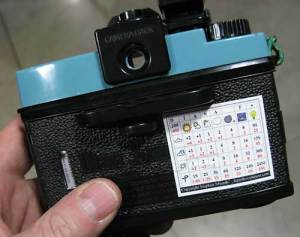
As many of you know I have been working with the Diana F+ camera for some time now for my new series of artworks, A New Eden. In the course of making these works I have spent considerable time working out what I feel is a fast reliable exposure system for the Diana Camera and I have now decided to share the results…(drumroll please)… may I present the Shoot Diana Exposure Calculator. Each chart is a premium vinyl adhesive sticker that can be attached to your camera back or the top of the Diana flash and provides easy to read information for a vast variety of shooting situations for both ISO 100 and 400 speed films.
The Shoot Diana Exposure Calculator differs from the FREE exposure calculator I posted a few days ago, in that it gives the required number of shutter clicks at “N” (1/60th) on the Diana to make the correct exposure for each situation AND it becomes part of your camera (see photo) so there is no way to lose it or forget to put it in your bag… Oh, and did I forget to mention that it is really cheap? Christmas is coming, people!
For more information please visit www.shootdiana.com
or just click here.
New Digital Paper Review, Canson and Hahnemuhle
As promised here are my paper tests/ review for the new offerings by Canson and Hahnemuhle. This audio review covers the following papers:
- Canson: Arches Platine, BFK Rives, Arches Aquarelle Rag
- Hahnemuhle: Bamboo 290 GSM.
Give a listen and then try some of these papers and determine what you like.
Viva la Revolution-
Stephen
Note: More tests to follow in the coming weeks…stay tuned!
Poll question: What is your favorite paper? Please note I have left out the Arches Platine as it is not currently available for purchase and the poll below is for Matt surface papers only. If your favorite paper is not listed please just click other and then type it in! I have listed what I feel is a good sample of true fine art papers…your vote counts! (You can vote for more than one.)
Canson/ Arches Platine Fiber Rag vs ?
I’m almost finished testing this material but I could not help but post a bit of a preview! The inner projection is an icc. made for an Epson 7880/ 9880 on a premium quality photo white gloss digital art paper…the outer wire frame projection is the new Canson/ Arches Platine Fiber Rag icc. made on our d’Vinci Printer. The difference is HUGE. On new machines from Epson, Canon and HP this paper will rock!
Oh yeah…did I forget to mention that the surface is beautiful as well?! Stay tuned!
Viva la Revolution- Stephen
 Figital Revolution