Publishing Your Own Photography Book

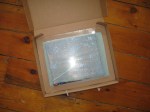
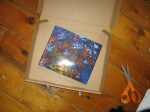
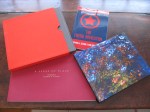
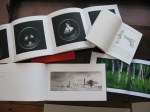
AudioBlog LogoHaving published 4 books in the last 10 years and seen radical transformations in not only the printing process but also in the selling of art books I decided to record this audio blog for anyone considering publishing their own book whether using a full scale fine art press, publisher or an online printing service. See the example images below for specific examples that are mentioned in the audio. Also, please comment on printing services you have used with your thoughts as well as suggestions that may be of interest/ help to our community.

Here is a nice online marketing badge provided by Blurb, for Free, so people interested in your book can have a direct link to its page on Blurb (note that I have one here in the right side bar and also on stephenschaub.com. Included are book specifications, cost, delivery options and a 15 page book preview (this is an option that you can decide to do or not do…you should do it) that I feel really helps sell your book.

Volume One
By Stephen M. Schaub

Beyond the Frame and Glass: Alternative Print Display Solutions

AudioBlog Logo

In this audio blog I give examples of multiple options for the display of photographic artworks beyond just a frame and glass. Given the current economic crisis, the tightening of clients budgets, and the ever-increasing cost of materials, these alternative print display solutions are a great option to consider for any fine art photographer requiring a modern presentation and an affordable price tag.

IMAGES:

LINKS:

Pin Clips

T- Pins… available at most craft stores.

Neodymium Micro Magnets

Magic Tape Velcro

Comments Count!

You knew all along that your comments count… but NOW, here at the world headquarters of the FR we’ve come up with a unique way to show it…

Figital Revolution Hat (drum roll please)…the Offical Figital Revolution Hat! This hat is very high quality, is custom embroidered, and IT IS NOT FOR SALE!

That’s right! The only way to get one is directly from Our Fearless Leader (you know- me) so bring on your comments and article suggestions. I will select comrades who post great, interesting, dialogue- inspiring thoughts and ideas to be recipients of this great and noble honor… And hey, in all seriousness, it is a nice hat!

Viva la Revolution- Stephen

How to Focus Your LOMO LCA

This short informational video provides useful information on how to get “in focus” images, or at least more of them with the LOMO LCA. Focus is over rated in my opinion but it is nice to know how to just in case!

Link to the DOF Chart referenced in the video:

http://www.dofmaster.com/dofjs.html


UPDATE:

“who the hell needs a video explaining zone focus? can it get any easier than this?”

Quote from a Flickr user who found this video (not sure if he watched it) and apparently found it revolting! I disagree completely that Zone Focus is easy, especially at first… fact is that most Zone focus camera users rely on many many rolls of experience or depth of field to get “sharp images”… this video points out a quick method to learn how to “focus” these systems (LCA) through visual memory and pace count.

Part 2 – Is Cross Processing or XPRO Dead?

AudioBlog Logo

This is Part 2 to the post I made yesterday…more thoughts. A good sub-title for this would be: Process Does Matter!

Viva la Revolution- Stephen

Is Cross Processing or XPRO Dead?

I’ve just started a film test in preparation for my trip to Italy next month– the two films in consideration are Kodak Ektar 100 and Agfa Precia CT cross processed. Thus far, most of the artworks from my current series A New Eden are either XPRO (cross processed- E6 film in C41 chem) or expired film. However- after much testing here on FR I have recently  fallen in love with the new Kodak Ektar  …SO I decided to do a quick comparison test and find out: does the XPRO effect really have to be actual cross-processed film?

So what do YOU think? Look at the snapshots below and see if you can pick out the one that is the Agfa Precia CT XPRO…only one is true XPRO…the others are all Kodak Ektar  in Photoshop using Alien Skin Exposure 2! 

Think you have the right answer? Then give a listen to the Audio portion of this post for additional thoughts on cross processing / Xpro… as well as the answer!

AudioBlog LogoPlease click on the logo to listen to the audio.


When you finish with part one, click here to listen to part 2!

Color Film Chart

colorfilmchartweb2-1

I’ve just started a user driven reference to different color films and their properties processed in C41 or XPRO (slide films processed in C41). Consider using this list to determine the proper color film for your photographic needs.

Do you have information on films you’ve tested? Consider sharing your knowledge here with your photographic comrades. The equation is simple…more photographers shooting film = a longer life for film!

Viva la Revolution!

New Kodak Ektar 100 vs Kodak 100 Ultra Color

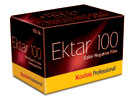
Kodak Ektar 100

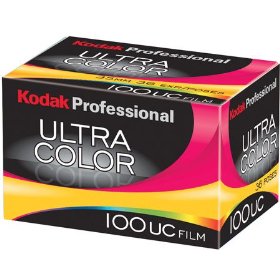
This is part 2 of my review of the new Kodak Ektar 100 film- click HERE to read part one. In this test I decided to compare the same scene photographed side by side, one shot with the new Kodak Ektar 100 and one with Kodak 100UC.

Test Specifications:

Camera: 2 Olympus XA cameras both just calibrated and shot at F8, focused at infinity.

Film: Kodak Ektar 100 rated at box speed (100) and Kodak 100UC also rated at box speed (100).
kodak100ucboxScanned on an Imacon scanner (dry) at 3000 PPI so around a 68MB 16 Bit RGB file.

Color Space: sRGB

No sharpening applied in the scan or in Photoshop. All scanner settings were set for Standard RGB Negative with full auto applied.

In Photoshop only AUTO settings were used (levels, contrast and color)- no additional image manipulation was applied. Test files were then down sampled to 8 Bit and reduced to 10″ x 6.5″ for faster download- saved as a JPEG, Level 10.

Please only download the sample files if you have a high speed internet connection as they are around 3MB each compressed.
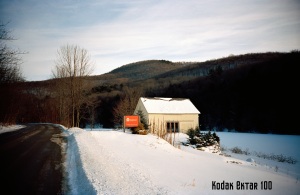
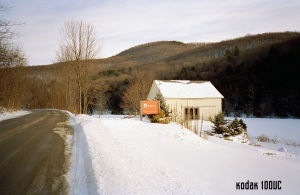
Kodak Ektar 100 Film TestKodak Ultra Color 100 Film TestMy Thoughts:

The Kodak 100 UC has a better exposure latitude, especially at box speed than Ektar 100 does but the grain is a bit more pronounced and the color is somewhat muted whereas the new Kodak Ektar 100 at box speed is a bit thin but has nice saturated colors and somewhat finer grain. Exposing the new Kodak Ektar at an EI of 50/ 64 will make this film very hard to beat.

Overall both films are quite nice but I tend to like the look of the Ektar best, especially when exposed at an EI of 50/ 64. I find scanning the new Kodak Ektar film quite easy and possible enlargements from a good sharp capture lens and a good quality scanner with a bit of work in Photoshop can produce some amazing quality prints even at sizes up to say 20″ x 30″… remember this is 35mm!

Note: If you want to try this film be sure to rate it at an EI of  50/ 64 otherwise your shadows will be thin and you will not be seeing all that is possible from this new offering. Yes, I like this film!

Please note that the sample files are for personal use only and are Copyright Stephen Schaub, 2009.